Build it yourself. This project is part of the AI Projects for Cloud Solution Architects portfolio. Full source, code, and the latest updates live in the csa-ai-projects repo on GitHub.
Some decisions shouldn't be fully automated. This guide builds a workflow where an agent handles the routing and policy checks, but a human approves or rejects via a Teams message — and every decision is logged immutably.
What You're Building
A Service Bus-triggered Azure Function kicks off a Foundry agent workflow. The agent checks policy via Foundry IQ, determines the right approver using a function call, sends that person a Teams Adaptive Card via Microsoft Graph API, and then waits. When the human responds (approve/reject), a second Function captures the decision, logs it to Cosmos DB, and sends a confirmation. Uses GPT-5.4-mini for reasoning.
Prerequisites
- Microsoft Foundry / Azure AI Services resource with Foundry IQ + GPT-5.4-mini deployed
- Azure Service Bus namespace (request queue)
- Azure Cosmos DB (for decision audit log)
- Microsoft Graph API access (Delegated or App permissions:
Chat.Create,TeamsMessage.Send) - Entra ID app registration with Graph permissions
- Azure CLI logged in (
az login) with Cognitive Services OpenAI User on the AI Services resource and Cosmos DB Built-in Data Contributor on the Cosmos account - Python 3.11+,
azure-functions,openai,azure-servicebus,azure-cosmos,msal
pip install "openai>=1.30.0" azure-identity azure-functions \
  azure-servicebus azure-cosmos msal python-dotenv
Architecture
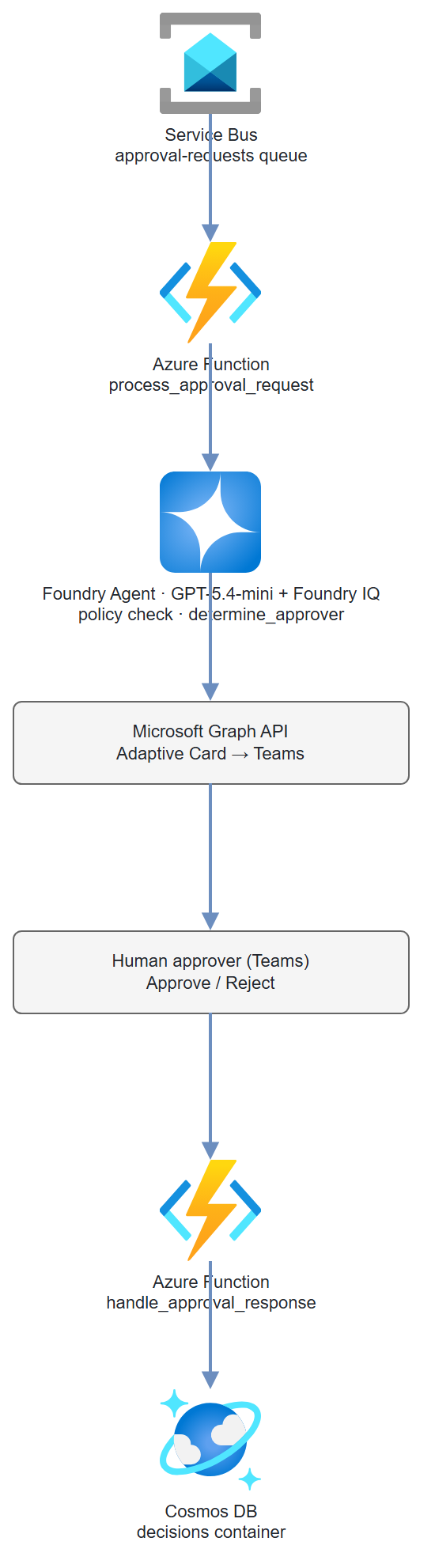
Step-by-Step Build
Step 1 — Register Entra ID app for Graph API
# Create app registration
APP_ID=$(az ad app create \
  --display-name "approval-workflow-app" \
  --query appId -o tsv)

# Add Microsoft Graph permissions (TeamsMessage.Send, Chat.Create)
az ad app permission add \
  --id $APP_ID \
  --api 00000003-0000-0000-c000-000000000000 \
  --api-permissions 75359482-378d-4052-8f01-80520e7db3cd=Role \
                    ebf0f66e-9fb1-49e4-a278-222f76911cf4=Role

# Grant admin consent
az ad app permission admin-consent --id $APP_ID

# Create client secret
SECRET=$(az ad app credential reset --id $APP_ID --query password -o tsv)
TENANT_ID=$(az account show --query tenantId -o tsv)
Step 2 — Create Cosmos DB audit log container
az cosmosdb sql container create \
  --account-name $COSMOS_ACCOUNT \
  --resource-group $RG \
  --database-name approval-workflow \
  --name decisions \
  --partition-key-path "/request_id"
Step 3 — Approver lookup function
# approver_rules.py
# In production, this would query HR systems or an LDAP directory
APPROVER_RULES = {
    "purchase": {
        "0-1000": "manager@company.com",
        "1001-10000": "director@company.com",
        "10001+": "vp@company.com"
    },
    "access": {
        "standard": "it-manager@company.com",
        "privileged": "security-officer@company.com"
    },
    "exception": {
        "default": "compliance@company.com"
    }
}

def determine_approver(request_type: str, amount: float = 0, access_level: str = "") -> dict:
    """Return approver email and display name for a request."""
    rules = APPROVER_RULES.get(request_type, APPROVER_RULES["exception"])

    if request_type == "purchase":
        if amount <= 1000:
            email = rules["0-1000"]
        elif amount <= 10000:
            email = rules["1001-10000"]
        else:
            email = rules["10001+"]
    elif request_type == "access":
        email = rules.get(access_level, rules.get("standard", "it-manager@company.com"))
    else:
        email = rules.get("default", "compliance@company.com")

    return {
        "approver_email": email,
        "approver_name": email.split("@")[0].replace("-", " ").title(),
        "approver_id": email   # In production: look up Entra Object ID
    }


APPROVER_TOOL_DEF = {
    "name": "determine_approver",
    "description": "Look up who should approve this request based on type and amount.",
    "parameters": {
        "type": "object",
        "properties": {
            "request_type": {
                "type": "string",
                "enum": ["purchase", "access", "exception"],
                "description": "Category of the approval request"
            },
            "amount": {
                "type": "number",
                "description": "Dollar amount for purchase requests"
            },
            "access_level": {
                "type": "string",
                "enum": ["standard", "privileged"],
                "description": "Access sensitivity for access requests"
            }
        },
        "required": ["request_type"]
    }
}
Step 4 — Teams message via Graph API
# graph_client.py
import os
import json
import urllib.request
import msal

def get_graph_token() -> str:
    """Get Microsoft Graph access token using client credentials."""
    app = msal.ConfidentialClientApplication(
        client_id=os.environ["ENTRA_CLIENT_ID"],
        client_credential=os.environ["ENTRA_CLIENT_SECRET"],
        authority=f"https://login.microsoftonline.com/{os.environ['ENTRA_TENANT_ID']}"
    )
    result = app.acquire_token_for_client(
        scopes=["https://graph.microsoft.com/.default"]
    )
    if "access_token" not in result:
        raise RuntimeError(f"Token acquisition failed: {result.get('error_description')}")
    return result["access_token"]


def send_approval_card(
    approver_id: str,
    request_id: str,
    request_summary: str,
    requester_name: str,
    callback_url: str
) -> str:
    """Send an Adaptive Card to the approver in Teams."""
    token = get_graph_token()

    # First: create or find a 1:1 chat with the approver
    chat_payload = json.dumps({
        "chatType": "oneOnOne",
        "members": [
            {
                "@odata.type": "#microsoft.graph.aadUserConversationMember",
                "roles": ["owner"],
                "user@odata.bind": (
                    f"https://graph.microsoft.com/v1.0/users/{approver_id}"
                )
            }
        ]
    }).encode()

    req = urllib.request.Request(
        "https://graph.microsoft.com/v1.0/chats",
        data=chat_payload,
        headers={
            "Authorization": f"Bearer {token}",
            "Content-Type": "application/json"
        }
    )
    with urllib.request.urlopen(req) as resp:
        chat = json.loads(resp.read())
    chat_id = chat["id"]

    # Send Adaptive Card
    card = {
        "type": "AdaptiveCard",
        "$schema": "http://adaptivecards.io/schemas/adaptive-card.json",
        "version": "1.4",
        "body": [
            {"type": "TextBlock", "size": "Large", "weight": "Bolder",
             "text": "Approval Required"},
            {"type": "TextBlock", "text": f"**Request ID:** {request_id}"},
            {"type": "TextBlock", "text": f"**From:** {requester_name}"},
            {"type": "TextBlock", "wrap": True,
             "text": f"**Summary:** {request_summary}"}
        ],
        "actions": [
            {
                "type": "Action.Http",
                "title": "Approve",
                "method": "POST",
                "url": callback_url,
                "body": json.dumps({
                    "request_id": request_id,
                    "decision": "approved",
                    "approver_id": approver_id
                }),
                "style": "positive"
            },
            {
                "type": "Action.Http",
                "title": "Reject",
                "method": "POST",
                "url": callback_url,
                "body": json.dumps({
                    "request_id": request_id,
                    "decision": "rejected",
                    "approver_id": approver_id
                }),
                "style": "destructive"
            }
        ]
    }

    message_payload = json.dumps({
        "body": {
            "contentType": "html",
            "content": "<attachment id=\"approval-card\"></attachment>"
        },
        "attachments": [{
            "id": "approval-card",
            "contentType": "application/vnd.microsoft.card.adaptive",
            "content": json.dumps(card)
        }]
    }).encode()

    req2 = urllib.request.Request(
        f"https://graph.microsoft.com/v1.0/chats/{chat_id}/messages",
        data=message_payload,
        headers={
            "Authorization": f"Bearer {token}",
            "Content-Type": "application/json"
        }
    )
    with urllib.request.urlopen(req2) as resp:
        msg = json.loads(resp.read())

    return msg["id"]
Step 5 — Azure Functions workflow
# function_app.py
import azure.functions as func
import json, os, logging, uuid
from datetime import datetime, timezone
from azure.cosmos import CosmosClient
from azure.identity import DefaultAzureCredential, get_bearer_token_provider
from openai import AzureOpenAI
from approver_rules import determine_approver, APPROVER_TOOL_DEF
from graph_client import send_approval_card

app = func.FunctionApp()
credential = DefaultAzureCredential()

# One Responses-API client drives the policy agent (Foundry IQ file_search +
# the determine_approver function tool). azure-ai-projects 2.x removed the
# Assistants threads/runs surface; the Responses API replaces it.
client = AzureOpenAI(
    azure_endpoint=os.environ["AZURE_OPENAI_ENDPOINT"],
    azure_ad_token_provider=get_bearer_token_provider(
        credential, "https://cognitiveservices.azure.com/.default"),
    api_version="2025-04-01-preview",
)
cosmos = CosmosClient(
    url=os.environ["COSMOS_ENDPOINT"],
    credential=credential
)
decisions = cosmos.get_database_client("approval-workflow").get_container_client("decisions")

CALLBACK_BASE_URL = os.environ["FUNCTION_APP_BASE_URL"]
MODEL = os.environ.get("APPROVAL_MODEL", "gpt-5.4-mini")

# Responses API tools: Foundry IQ grounding via file_search + a flat function tool.
TOOLS = [
    {"type": "file_search", "vector_store_ids": [os.environ["POLICY_VECTOR_STORE_ID"]]},
    {"type": "function", **APPROVER_TOOL_DEF},
]

INSTRUCTIONS = (
    "You are an approval workflow agent. For each request:\n"
    "1. Check the policy documents to determine if the request is in-policy\n"
    "2. If in-policy, call determine_approver() to find the right approver\n"
    "3. Summarize the request in 2 sentences for the approver\n\n"
    "If the request violates policy, return {is_in_policy: false, reason: '...'}"
)


@app.service_bus_queue_trigger(
    arg_name="msg",
    queue_name="approval-requests",
    connection="SERVICE_BUS_CONNECTION_STRING"
)
def process_approval_request(msg: func.ServiceBusMessage):
    payload = json.loads(msg.get_body().decode())
    request_id = payload.get("request_id", str(uuid.uuid4()))
    logging.info(f"Processing approval request: {request_id}")

    # file_search runs server-side; only determine_approver needs a round-trip.
    response = client.responses.create(
        model=MODEL,
        instructions=INSTRUCTIONS,
        input=f"Process this approval request:\n\n{json.dumps(payload, indent=2)}",
        tools=TOOLS,
    )

    approver_info = {}
    for _ in range(8):  # safety cap on function-call rounds
        fn_calls = [it for it in response.output
                    if getattr(it, "type", None) == "function_call"]
        if not fn_calls:
            break
        tool_outputs = []
        for call in fn_calls:
            if call.name == "determine_approver":
                args = json.loads(call.arguments or "{}")
                approver_info = determine_approver(**args)
                result = json.dumps(approver_info)
            else:
                result = json.dumps({"error": f"Unknown function: {call.name}"})
            tool_outputs.append({
                "type": "function_call_output",
                "call_id": call.call_id,
                "output": result,
            })
        response = client.responses.create(
            model=MODEL,
            previous_response_id=response.id,
            input=tool_outputs,
            tools=TOOLS,
        )

    agent_summary = response.output_text

    # Record pending decision
    decisions.upsert_item({
        "id": request_id,
        "request_id": request_id,
        "status": "pending",
        "payload": payload,
        "approver": approver_info,
        "agent_summary": agent_summary,
        "created_at": datetime.now(timezone.utc).isoformat()
    })

    # Send Teams card to approver
    if approver_info.get("approver_id"):
        callback_url = f"{CALLBACK_BASE_URL}/api/handle_approval?code={os.environ['FUNC_KEY']}"
        send_approval_card(
            approver_id=approver_info["approver_id"],
            request_id=request_id,
            request_summary=agent_summary[:300],
            requester_name=payload.get("requester_name", "Unknown"),
            callback_url=callback_url
        )
        logging.info(f"Teams card sent to {approver_info['approver_id']}")


@app.route(route="handle_approval", methods=["POST"])
def handle_approval_response(req: func.HttpRequest) -> func.HttpResponse:
    """Called by Teams Adaptive Card button press."""
    body = req.get_json()
    request_id = body.get("request_id")
    decision = body.get("decision")
    approver_id = body.get("approver_id")

    if not all([request_id, decision, approver_id]):
        return func.HttpResponse("Missing fields", status_code=400)

    # Update decision record
    item = decisions.read_item(item=request_id, partition_key=request_id)
    item.update({
        "status": decision,
        "decided_at": datetime.now(timezone.utc).isoformat(),
        "decided_by": approver_id
    })
    decisions.upsert_item(item)
    logging.info(f"Decision recorded: {request_id} → {decision}")

    return func.HttpResponse(
        json.dumps({"status": "recorded", "decision": decision}),
        status_code=200,
        mimetype="application/json"
    )
Test It
# Send a test approval request to Service Bus
import json
from azure.servicebus import ServiceBusClient, ServiceBusMessage

sb = ServiceBusClient.from_connection_string(os.environ["SERVICE_BUS_CONNECTION_STRING"])
with sb:
    sender = sb.get_queue_sender("approval-requests")
    with sender:
        msg = {
            "request_id": "REQ-2024-0042",
            "request_type": "purchase",
            "amount": 3500.00,
            "requester_name": "Alex Johnson",
            "requester_email": "alex.johnson@company.com",
            "description": "Ergonomic desk chair for home office setup",
            "business_justification": "Current chair causing back issues affecting productivity"
        }
        sender.send_messages(ServiceBusMessage(json.dumps(msg)))
        print("Test request sent")
Check Cosmos DB for the pending decision, then simulate the Teams approval:
curl -X POST "http://localhost:7071/api/handle_approval" \
  -H "Content-Type: application/json" \
  -d '{"request_id":"REQ-2024-0042","decision":"approved","approver_id":"director@company.com"}'
Common Mistakes
- Reaching for the old Assistants
agentsAPI.azure-ai-projects2.x removed the threads/runs Assistants surface —AIProjectClienthas no.agents, andFunctionTool/FileSearchTool/PromptAgentDefinition/MessageRole/SubmitToolOutputsActionno longer drive a run. Useclient.responses.create(..., tools=[{"type":"file_search", "vector_store_ids":[...]}, {"type":"function", ...}])and a function-call loop keyed offprevious_response_id, as shown above. - Adaptive Card Action.Http not supported in all Teams clients.
Action.Httprequires the Teams client to support it — older desktop clients may not. Test on both desktop and mobile Teams. - Graph API Chat creation fails with 403. Ensure
Chat.Createpermission was granted admin consent. Check withaz ad app permission list --id $APP_ID. - Cosmos DB optimistic concurrency. Two approvers clicking simultaneously can cause conflicts. Add an
_etagcheck when updating the decision record.
Extend It
- Escalation timer: If no decision within 48 hours, an Azure Function timer escalates the request to the approver's manager automatically.
- Approval chain: For high-value requests (>$50K), require two sequential approvals. Store the approval chain in Cosmos DB as an array and gate each step.
- Power Apps UI: Replace the Teams card with a Power Apps canvas app that shows all pending approvals in a dashboard, with bulk-approve capability for managers.