$
cat posts/azure-landing-zones.md
Azure Landing Zones: A Practical Architect's View
What Is a Landing Zone, Really?
Forget the marketing deck for a minute. An Azure Landing Zone is just this: **a set of subscriptions, policies, and networking that lets your teams ship workloads without filing a ticket and waiting three weeks for someone to provision a VNet**.
That's it. Enablement, not control.
You're not trying to lock things down. You're building guardrails so teams can move fast without accidentally exposing a storage account to the internet or spinning up a D64 VM in production for a dev workload.
Reference Architecture
The canonical structure looks like this:
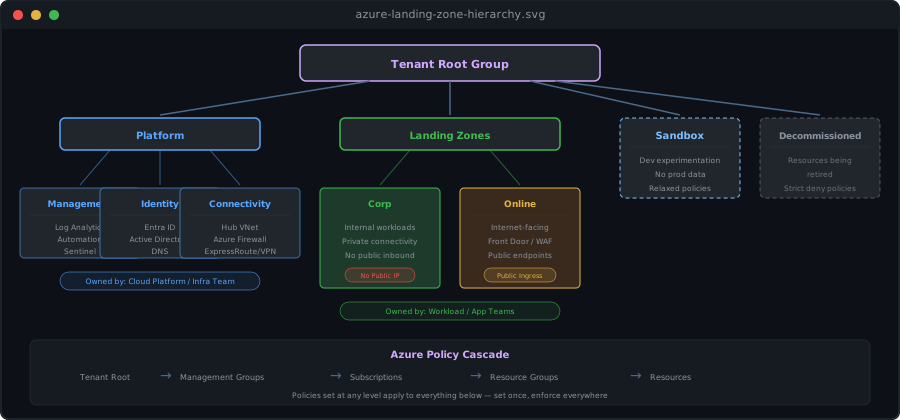
Each level is a **management group** with Azure Policies attached. Policies cascade downward — set it once at the top, it applies everywhere below. This is the bit that makes the whole thing work.
Key Principles
1. Draw the Line Between Platform and Workload
The **Platform** subscriptions belong to your central team — cloud platform, infra, security. They own the networking, identity, and monitoring.
The **Landing Zone** subscriptions belong to workload teams. They deploy their apps, databases, and services. They can't mess with the networking or bypass security — but they shouldn't need to. The platform team already set up the VNets, peering, and DNS before they arrived.
Get this boundary wrong and you end up in one of two places:
• **Central bottleneck**: Every team queues up for infra to provision a VM. Deployments take weeks.
• **Wild west**: Every team rolls their own networking. Security becomes a prayer.
Neither is fun. I've seen both.
2. Hub-Spoke Networking
Still the best pattern for most organisations:
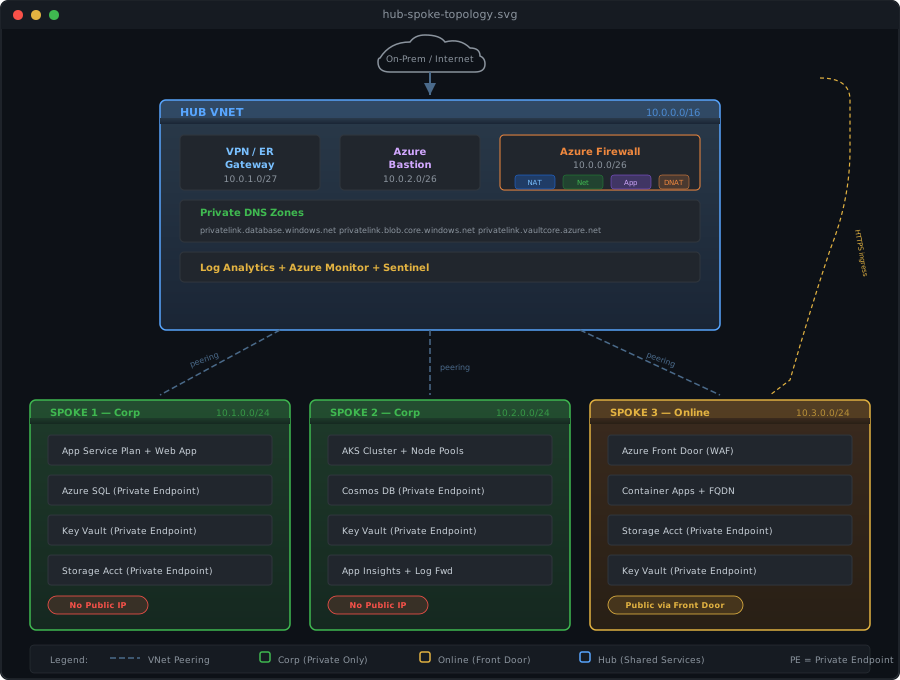
A few things to notice. The Corp spokes have zero public endpoints — everything goes through private endpoints. The Online spoke has a Front Door for internet ingress but the backend services are still private. All inter-spoke traffic routes through the hub firewall, giving you centralised logging, consistent security policies, and a single point for on-prem connectivity.
3. Governance: Start Light
I've watched organisations spend three months writing 200 Azure Policies before deploying a single workload. Don't be that team.
**Day 1 — the non-negotiables:**
• Allowed regions (data sovereignty, no surprises)
• Required tags: CostCenter, Owner, Environment. You will thank yourself later.
• Deny public IP creation in Corp landing zones
• Enforce HTTPS on storage accounts
• Require managed identity on compute
**Month 2 — once you've got workloads running:**
• Restrict VM SKUs (someone will spin up an ND96 "just to test")
• Enforce diagnostic settings on everything
• Deny classic resource creation
• Require private endpoints for PaaS services
**Things to resist doing:**
• Blocking everything and building an exception request form. That's not governance. That's bureaucracy.
• Writing custom policies when a built-in one already exists
• Deploying policies straight to Deny without testing in Audit mode first. You will break things.
Common Mistakes
Over-Engineering the Hierarchy
You don't need 7 levels of management groups. Most organisations need 3, maybe 4:
Root → Platform + Landing Zones + Sandbox
Done. Add more levels only when you have a specific policy that genuinely needs to apply at that level and nowhere else.
Ignoring IP Address Planning
This is the number one networking headache I see. Plan your address space before you deploy anything:
• Reserve a /16 for the hub
• Assign /24 per spoke (bump to /22 if you know you'll need it)
• Write every allocation down in a central IPAM tool
• Leave more room than you think you need. You will add more spokes.
Not Automating Subscription Vending
If getting a new landing zone subscription takes more than a day, something's broken. Build a vending machine:
1. Developer requests a subscription (portal, API, whatever)
2. Automation drops it into the right management group
3. Baseline policies and RBAC applied automatically
4. VNet peered to the hub
5. Diagnostic settings configured
6. Developer gets connection details
Minutes, not days. If your platform team is still doing this by hand, that's your first automation project.
Getting Started
Starting from zero? Use the Azure Landing Zone Accelerator in the portal — search for "Enterprise Scale" in the custom template deployment. It walks you through the whole thing.
Or go with Bicep/Terraform if you want full control. The ALZ modules are well-maintained and battle-tested. Either way, start deploying. The worst landing zone is the one that's still in a PowerPoint deck.